使用 Let's Encrypt 加入全站 HTTPS 支持
- 2017-10-11 更新: renew 错误
- 2017-10-12 更新: 使用 --webroot 更新证书
- 2018-03-23 更新: 使用通配符
去年我写了一个太监系列 HTTPS 小白知识(一) ,其中提到使用 Let's Encrypt 来实现 HTTPS 支持。现在是时候了。
昨天我花了半小时把我的所有网站和博客全部加入了 HTTPS 支持。整个过程非常顺利,下面拣要点说一说。
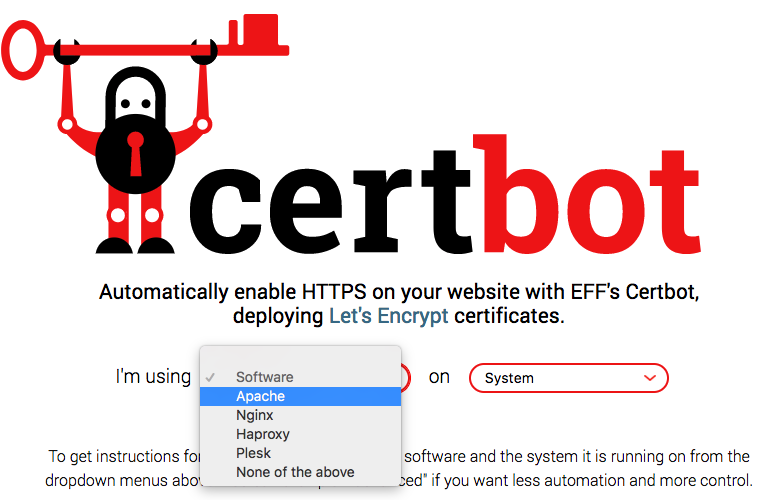
根据 Let's Encrypt 的文档,我们需要把情况分成 拥有服务器权限 和 没有服务器权限 两种。 我的所有网站也正好包含这两种情况。Let's Encrypt 建议使用 Certbot 这个工具来自动请求证书。
在服务器上操作
Certbot 的使用很简单,选择了你的 web 服务器和操作系统版本后,网站会告诉你如何下载最新版本的 Certbot 。由于我使用的是 Ubuntu 12.04 ,就直接下载 Certbot 的运行脚本 certbot-auto:
1wget https://dl.eff.org/certbot-auto
2chmod a+x certbot-auto
{{
2018年3月13日,Let's Encrypt 开始支持通配符证书的申请 。在申请通配符证书的时候需要注意以下几点。
1. 升级 certbot
我使用的版本是 v0.22.2
2. 切换API
如果 Certbot 提示下面的错误,说明需要切换支持 ACME2 的服务器 API 地址:
The currently selected ACME CA endpoint does not support issuing wildcard certificates.
有两种方法:
在调用 certbot 的时候提供 --server 参数:
1$ sudo certbot --server https://acme-v02.api.letsencrypt.org/directory
也可以直接把这个配置写到配置文件中:
1echo "server=https://acme-v02.api.letsencrypt.org/directory" >> ~/.config/letsencrypt/cli.ini
3. 增加 DNS TXT 记录
为了证明你是域名的所有者,你需要为自己的域名增加一条名为 _acme-challenge 的 DNS TXT 记录,具体的值则根据 certbot 的提示填写。
4. 通配符和裸域名
最后要注意的问题是,通配符证书并不一定支持裸域名。
例如,我申请的通配符证书 *.zengrong.net 可以支持 blog.zengrong.net/www.zengrong.net ,但并不一定能支持 zengrong.net 。
证书更新
使用 renew 更新
Let's Encrypt 的证书有效期为三个月,在证书到期时间还剩一个月的时候,你会收到要求更新证书的提醒邮件。
根据文档 ,更新证书相当简单。但我在更新上文中通过 certonly 申请的证书时,却碰到下面的错误:
1$ sudo certbot --debug renew --dry-run
2Saving debug log to /var/log/letsencrypt/letsencrypt.log
3
4Processing /etc/letsencrypt/renewal/blog.zengrong.net.conf
5Cert is due for renewal, auto-renewing...
6Could not choose appropriate plugin: The manual plugin is not working; there may be problems with your existing configuration.
7The error was: PluginError('An authentication script must be provided with --manual-auth-hook when using the manual plugin non-interactively.',)
8Attempting to renew cert (blog.zengrong.net) from /etc/letsencrypt/renewal/blog.zengrong.net.conf produced an unexpected error: The manual plugin is not working; there may be problems with your existing configuration.
9The error was: PluginError('An authentication script must be provided with --manual-auth-hook when using the manual plugin non-interactively.',). Skipping.
出现这个错误的原因是在非交互模式下, Certbot 并不知道如何确认网站是你的。我们可以自己写一个 hook 解决鉴权问题,在这个 hook 中上传鉴权文件到 web 服务器。详见: Pre and Post Validation Hooks 。
使用 standalone 更新
如果不愿意自己写 hook ,80 或者 443 端口有一个空余,那么可以使用 --standalone 来更新,同时使用 --preferred-challenges 来指定使用的端口。默认使用 80 端口。
1sudo certbot certonly --debug --force-renew -a standalone -d blog.zengrong.net
使用 webroot 更新
如果 443 和 80 端口都被占用了, 我们当然不应该为了更新安全证书而停止网站服务。此时可以使用 --webroot 插件来更新证书。
以 zengrong.net 的证书更新为例,使用 -w 参数指定网站根目录地址,使用 -d 参数来指定域名,多个域名也没问题。
1% certbot certonly --webroot -w /srv/www/zengrong.net -d zengrong.net -d www.zengrong.net
在上面的操作中,certbot 会自动生成鉴权文件,保存在网站根目录下,并发起一个 http 访问以确认域名的所有者是你。 注意这里默认使用的是 http 访问。所以如果你的网站仅监控了 https 请求的话,需要做一下 配置 ,或者使用 --preferred-challenges tls-sni 指定脚本使用 443 端口。
使用 manual 更新
如果没有服务器控制权,就只能使用 --manual 来更新了。Certbot 会询问你问题并将指导你上传一个文本文件到服务器目录中以证明网站是你的。参见 没有服务器权限 。
1certbot certonly --debug --force-renew -a manual -d blog.zengrong.net
您与此网站之间建立的连接并非完全安全
启用了 HTTPS 之后,可能会碰到这样的情况:
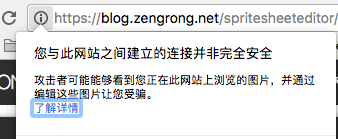
这是因为该页面中可能包含非 HTTPS 内容,例如显示了一个位于 HTTP 网站上的图像,或者引用了一个 HTTP 网站上的 JS。对于 HTTPS 网站来说,其中嵌入的所有内容都必须是 HTTPS 的。
打开 Chrome 的开发者工具,可以在 console 中看到这样的 warning:
Mixed Content: The page at 'https://blog.zengrong.net/spritesheeteditor/' was loaded over HTTPS, but requested an insecure image 'http://i.creativecommons.org/l/by-nc-sa/4.0/88x31.png'. This content should also be served over HTTPS.
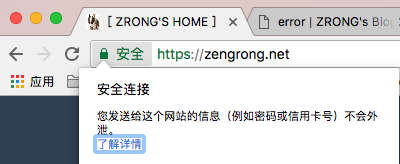
我们需要仔细查看网站中包含的图像、Javascript、CSS 等,确保其处于 HTTPS 域。如果把这些问题都解决了,那么网站的显示应该是这样的:
检测网站安全性
使用 SSL Labs 提供 的 SSL Server Test 工具来检测自己网站的安全性,进入下面的链接,输入自己的网址即可:
https://www.ssllabs.com/ssltest/analyze.html
- 文章ID:2650
- 原文作者:zrong(Jacky)
- 原文链接:https://blog.zengrong.net/post/add-https-support-with-letsencrypt/
- 版权声明:本作品采用 署名-非商业性使用-相同方式共享 4.0 国际 (CC BY-NC-SA 4.0) 进行许可,非商业转载请注明出处(原文作者,原文链接),商业转载请联系作者获得授权。